

Crop Marks PowerScript for Adobe Illustrator
- Pay once, no subscription
- Free updates
- Windows and Mac, Adobe Illustrator
- Runs inside the PowerScripts panel
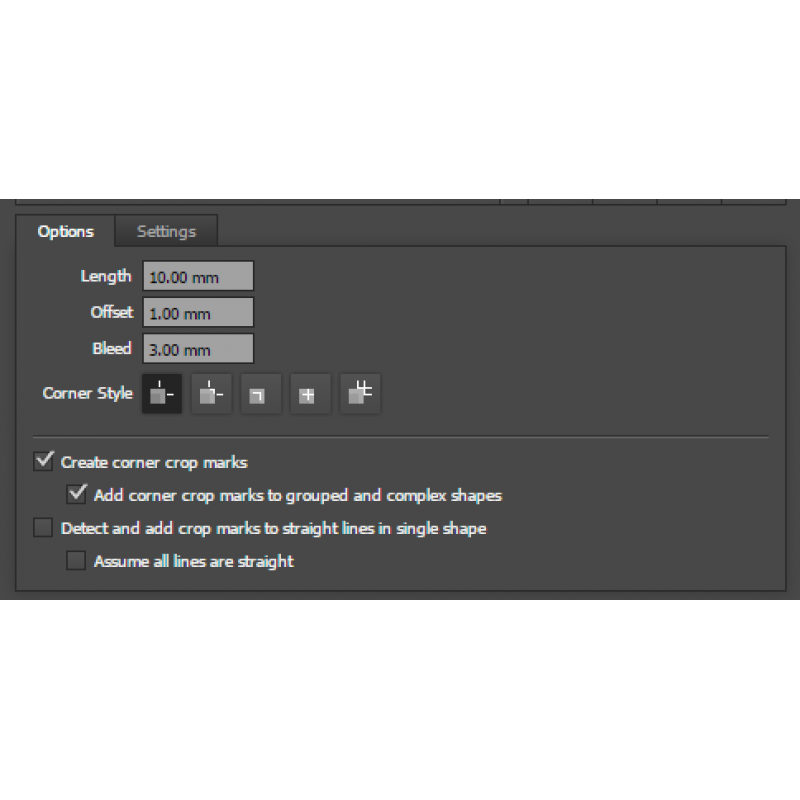
Crop marks that fit the job: standard corner marks, centre and fold marks, eight styles, and even marks for irregular shapes like triangles, placed from the straight edges of the shape.
8 styles
Pick the look your finishing team likes.
Any shape
Marks for every straight edge of a single shape.
Full control
Bleed, length, offset, stroke and which marks you want.
Corner marks or marks on every edge
Complex or grouped artwork gets standard corner crop marks. A single shape gets a crop mark for each of its straight lines, so triangles, hexagons and odd shapes can be cut accurately.
Set them up your way
Set the bleed, line length, offset, stroke width and colour. Choose which individual marks are made, add centre and fold marks, add an outline so the marks show on any background, and add frames around the marks.
Who it's for
- Print finishersAccurate marks for guillotine and hand cutting.
- Sign and displayMarks for odd-shaped panels and cut-outs.
- PrepressThe right marks without fiddling with Illustrator's own.
* This product is a digital download.
System Requirements
• Windows PC or Mac
• Adobe Illustrator 2022 or later
• Internet Connection required to activate
Related Products
Printers Script Package (includes 33 PowerScripts) for Adobe Illustrator
The complete set for printers and designers: every design, colour, chart, PDF, prepress and finish..
$395.00 USD $805.00 USD Ex Tax: $395.00 USD
Production Script Package (includes 24 PowerScripts) for Adobe Illustrator
For designers and prepress professionals: everything in the Designers package plus Nesting, Barcod..
$210.00 USD $480.00 USD Ex Tax: $210.00 USD