

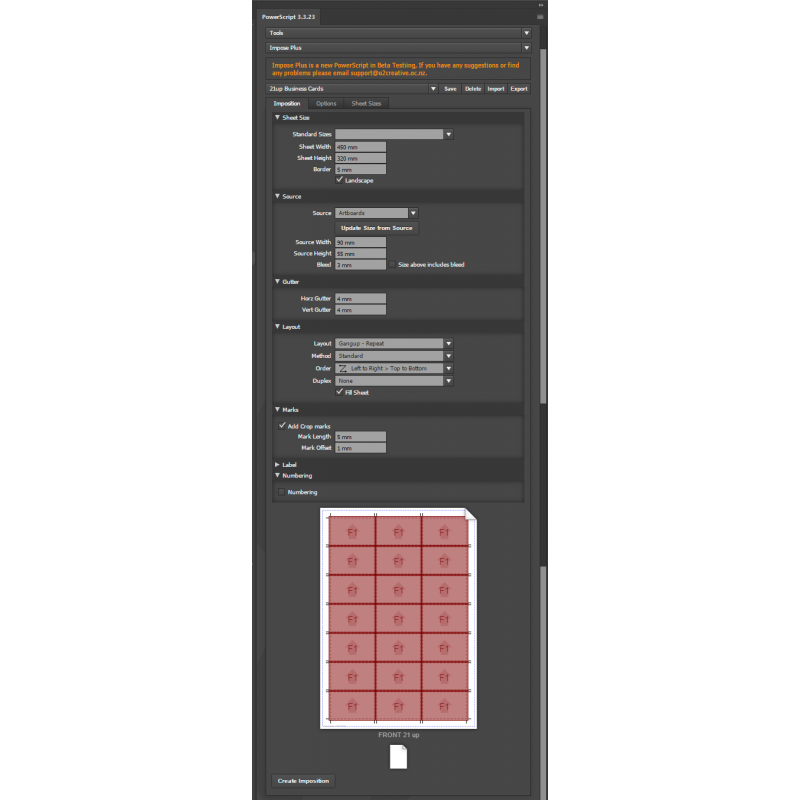
Imposition-PLUS Advanced multi-page Imposition for Adobe Illustrator
- Pay once, no subscription
- Free updates
- Windows and Mac, Adobe Illustrator
- Runs inside the PowerScripts panel
Multi-page imposition inside Illustrator. Turn your artboards, your selected artwork or a PDF file into print-ready sheets: gang-ups, unique pages, collate-and-cut stacks and saddle-stitched booklets, single or double sided, with crop marks, labels and numbering, and a live preview as you set it up.
Four layouts
Gang-up repeat, gang-up unique, collate cut and booklets.
Duplex
Left/right or top/bottom, unique backs or the same on both sides.
Numbering
Number vouchers and tickets on every copy.
Live preview
See the sheet before anything is made.
From artboards, a selection or a PDF
Impose the current artboards, the selected artwork, or a PDF file (no document needs to be open, and PDFs over 100 pages are fine). Set the trim size yourself or take it from the source, add bleed, and pick a common sheet size or your own, landscape or portrait, with the unprintable border of your press.
The layout you need
Gang-up repeat, gang-up unique, gang-up unique collate cut (stacks that come off the guillotine in order), and booklets for saddle stitching, with creep for thick booklets and blank pages added when the page count isn't a multiple of four. Alternate rows for head-to-head or foot-to-foot work, four page orders, gutters, and rows and columns set by hand or filled automatically.
Double sided done right
Duplex left/right or top/bottom, with the next page on the back (traditional duplex) or the front repeated on the back for quick double-sided prints.
Ready for the press and the guillotine
Crop marks, sheet labels (with the PDF's name when you impose a PDF) and numbering: find and replace text with numbers, with a start, a step and minimum digits, for vouchers and tickets. Save your settings as presets.
New in the free updates
- Impose straight into the current document, which is faster as nothing is copied between documents, and remove the old artboards so only the imposed sheets are left.
- Much more reliable PDF imposing: no extra windows opening, page counts read quickly and correctly, pages placed exactly, and PDFs over 100 pages.
- Choosing a PDF fills in its first and last page straight away.
- Booklets with any page count, and creep that moves the inner sheets.
Who it's for
- Digital print shopsBusiness cards, flyers, postcards and booklets on SRA3 and larger sheets.
- PrepressImpose customer PDFs without leaving Illustrator.
- Ticket and voucher printingNumbered gang-ups that cut and stack in order.
- Short-run publishersSaddle-stitched booklets with creep.
* This product is a digital download.
System Requirements
• Windows PC or Mac
• Adobe Illustrator 2022 or later
• Internet Connection required to activate
Related Products
Printers Script Package (includes 33 PowerScripts) for Adobe Illustrator
The complete set for printers and designers: every design, colour, chart, PDF, prepress and finish..
$395.00 USD $805.00 USD Ex Tax: $395.00 USD